


MangaKu: Read Comics & Manga
0.00.00 Reviews
App Specs
- Version
- 2.0.5
- Updated On
- License
- Free
- Downloads
- 50,000+
- Developer
- Wahidev
- Categories
- Comics
- Platform
- Android
Screenshots
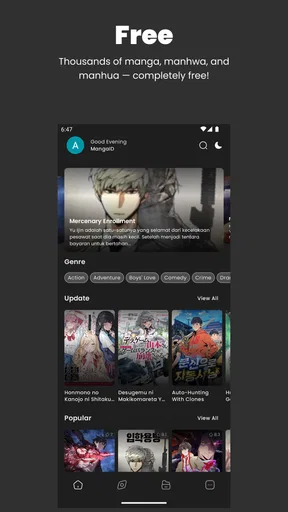
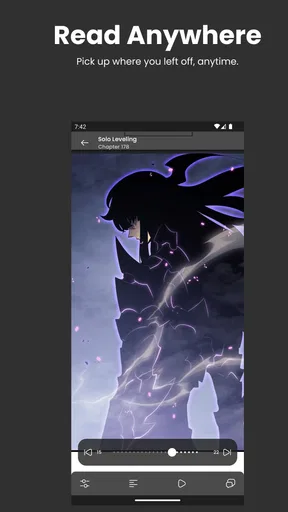
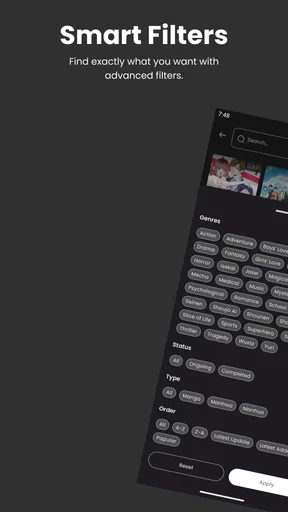
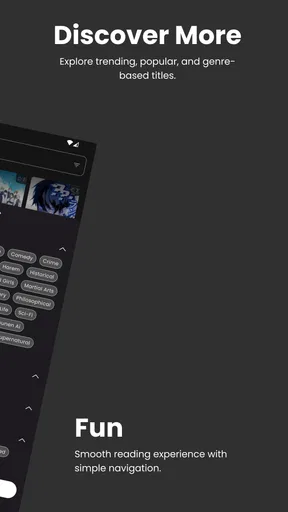
 Analysis by AppCompare
When I judge a comics reader, I look beyond the promise of a big catalogue: I want to know whether it fits the way I actually read, and whether the choices it puts in front of me feel clear. MangaKu: Read Comics & Manga is a free comics app from Wahidev, aimed at readers who want to browse manga and settle into a chapter without much fuss. Its appeal is easy to understand, but I’d approach it as a convenient reading option rather than assume that every detail of the experience will suit every reader.
What I would check before settling in
For a reading app, trust is partly about the content and partly about the surrounding experience. I would pay attention to the choices shown while browsing, what the app asks me to do before reading, and whether I can understand how to move between discovery and a chapter. I don’t treat a minimal interface as proof of a particular privacy practice; I treat clear, visible choices as more useful than assumptions.
MangaKu is listed for teens, so I would still use ordinary judgement about the stories being read and the device being shared. An age label is a broad guide, not a substitute for checking whether a particular title feels right for the reader. That matters especially when a younger fan uses a family phone or tablet: I’d browse together at first and make sure the reading environment is comfortable.
How I’d make the first session useful
I’d begin with a specific goal instead of scrolling indefinitely: find a series I already know, look for a genre I’m in the mood for, or sample a chapter before committing to a long read. That makes it easier to judge whether the catalogue and navigation work for me. If I’m testing a new reader, I also like to open a chapter and check the page flow before investing time in a series.
For a short break, I’d choose a self-contained chapter or a series I can follow in small pieces. For a longer trip, I’d decide what to read while I have a stable connection and avoid relying on an untested setup at the last minute. A practical habit is to close the app after reading and later check whether returning to the same story feels straightforward; that tells me more about everyday convenience than a quick tour of menus.
Getting Started with MangaKu
Jumping into MangaKu is as easy as pie. The download process is smooth, and before you know it, you’re greeted with an interface that feels like slipping into a cozy pair of slippers—comfortable and intuitive. The app works like a charm on both Android and iOS, which means you can carry your favorite stories wherever you go.
User Interface and Experience
The first thing that strikes you about MangaKu is its clean and streamlined design. It’s not just about looking good; navigation is a breeze. Whether you’re a tech whiz or someone who’s just getting the hang of smartphones, you’ll find it easy to get around. The categories are well-organized, allowing you to explore by genre, popularity, or the latest releases.
Worth Reading Before You Choose

Flipboard Shows What News Apps Must Do Beyond the Feed

Switching to Android Auto Means Rethinking Your Driving Routine

Google Calendar Makes a Crowded Week Easier to Manage

Ludo King Makes the Most of the Minutes Between Plans

Baby Panda World Brings Quick Play to Modern Phones, but Its Game Library Feels Busy

ESPN’s Live Game View Makes Following Close Games Easier
- Search Functionality: The search bar is robust and accurate, helping you find your favorite manga titles in no time. It’s like having a personal librarian at your fingertips.
- Reading Options: You can choose between different reading modes, whether you prefer scrolling or swiping. It accommodates your reading style seamlessly.
Content Library
Now, let’s talk about what really matters—the content. MangaKu boasts an impressive library that covers a wide range of genres. From action-packed adventures to heartwarming romances, it’s all there waiting for you. And the best part? The collection is updated regularly, so you’ll never run out of new stories to dive into.
For those who love a good series, MangaKu doesn’t disappoint. It offers complete series for binge-reading, and the app remembers where you left off, so you can pick up right where you left off without a hitch.
Offline Reading
Let’s be real, not all of us have access to Wi-Fi 24/7. That’s where MangaKu’s offline reading feature shines. You can download your favorite chapters and enjoy them without needing an internet connection. Perfect for those long commutes or when you’re just chilling in a Wi-Fi dead zone.
Community and Interaction
What’s manga without a community to share it with? MangaKu has a vibrant community section where you can connect with fellow manga lovers. Discuss plot twists, share recommendations, or just gush about your favorite characters. It’s like a virtual manga club that fits right in your pocket.
I’d treat that social side as an optional part of the experience, not a reason to use the app by itself. If I mainly want uninterrupted reading, I can focus on finding a chapter and leave discussion for later. If I do join a conversation, I’d avoid sharing personal details just to talk about a series; a comics discussion rarely needs them. That small boundary is useful in any reader with social features, particularly when a device is shared or used by a younger fan.
Customization and Personalization
We all have our quirks when it comes to reading. Maybe you like a dark mode at night or a larger font for easier reading. MangaKu offers a range of customization options to tailor your reading experience. Adjust the settings to fit your preferences and enjoy a personalized manga journey.
My practical tip is to make those adjustments before a long session rather than halfway through a chapter. A comfortable brightness and a reading direction that suits the format can reduce fiddling, while a quick test with a few pages helps reveal whether a setting feels natural. I’d also revisit those choices when switching from a bright room to reading in bed: what looks comfortable in daylight may not be comfortable late at night.
Where it fits among other comics readers
Compared with a digital storefront built around buying individual volumes or subscriptions, MangaKu’s free entry point is more appealing for casual browsing and sampling. A paid publisher app may be the better choice if I want a particular official release, a clear purchase history, or a reading setup centered on titles from that publisher. Those options can be less convenient for casually trying different material, while a free reader can make discovery feel lower-commitment.
It also differs from reading through a browser: an app can make returning to a familiar reading routine feel more direct, while a browser may be preferable to someone who wants to avoid installing another app. I wouldn’t choose solely on the word “free.” I’d compare the specific titles I care about, the reading controls I actually use, and the clarity of the choices presented in each service. A broad catalogue is only useful if it contains the series I want to follow.
Who is likely to enjoy it, and who may prefer something else
I can see MangaKu working well for readers who like to browse, want a simple way to get into manga, and don’t mind exploring before settling on a series. It also suits someone who reads in short bursts: a chapter during a quiet lunch break, then another while waiting for an appointment. Daily updates can be a reason to check back, but I’d avoid turning that into pressure to keep up; reading should fit around the day, not become another obligation.
It is less compelling for someone who already knows exactly which licensed editions they want and prefers to buy them directly from a publisher or established digital shop. It may also be the wrong fit for a reader who wants extensive, clearly documented account and privacy controls before trying a service. In that case, I’d compare the available choices carefully and use a platform whose terms and controls match my expectations rather than assume that a pleasant interface answers those questions.
Everyday trade-offs and a sensible routine
Picture a commute with patchy reception. I’d pick a chapter before leaving home, use the available offline option, and open it once while still connected so I know the reading session is ready. That is more dependable than waiting until the train enters a tunnel to discover I have not prepared anything. The same routine helps on a flight or during a day out: plan a modest reading queue, rather than saving a large pile I may never open.
On the other hand, when I’m browsing for something new, I’d do that while connected and give myself a stopping point. It’s easy for a catalogue to turn a five-minute break into aimless searching. Looking for one genre or a particular title first makes the search more purposeful. If a series doesn’t catch me after a fair sample, I’d move on instead of treating a large library as a reason to force myself through it.
Availability and fit for your device
MangaKu is free, has a Teen content rating, and is published by Wahidev. It was released on April 8, 2024, and version 2.0.5 requires Android 8.0 or later. The app has over 50,000 installs, while its average rating is 0.0, so I wouldn’t use a star score as a shortcut for deciding whether it suits me. I’d start with the actual reading experience and the titles I can find.
Although the original article describes availability on Android and iOS, the version and minimum operating-system details here specifically give an Android requirement. If I were deciding on a particular phone or tablet, I’d check the relevant platform’s current app page and compatibility before installing. A device that meets the stated Android requirement is a sensible starting point, but I’d also consider practical things like screen size and whether I’m comfortable reading panels on that display.
Final Thoughts
All in all, MangaKu: Read Comics & Manga is a delightful app for anyone who loves getting lost in the world of manga. It combines a user-friendly interface with a vast library, making it a must-have for manga fans. Whether you’re a seasoned reader or new to the genre, MangaKu is sure to enhance your manga experience. So why not give it a try? Dive into those manga worlds and let your imagination run wild.
My cautious verdict is that I’d try it as a low-commitment way to explore comics and manga, then decide based on the specific titles and reading flow I find useful. I’d keep my expectations grounded, check the choices shown in the app for myself, and use a publisher-focused alternative when a particular official edition matters more than casual discovery. That leaves MangaKu in a clear role: a potentially handy companion for browsing and everyday reading, provided its catalogue and controls feel right for you.
Pros
- User-friendly interface enhances reading experience.
- Extensive manga library offers diverse genres.
- Offline reading supports convenient access.
- Regular updates keep the content fresh.
- High-quality images enhance visual appeal.
Cons
- Contains ads that may interrupt reading.
- Limited customization for reader preferences.
- Occasional bugs in offline mode.
- Requires stable internet for streaming manga.
- Some titles lack official translations.
FAQs for MangaKu: Read Comics & Manga
What features does MangaKu offer for reading manga and comics?
MangaKu provides a comprehensive reading experience with features such as customizable reading modes (vertical or horizontal), offline reading capabilities, and a large library of manga and comics across various genres. The app also allows users to bookmark their favorite series, receive notifications for new chapters, and adjust reading settings like brightness and text size for optimal comfort.
Is MangaKu free to use, or does it require a subscription?
MangaKu offers both free and premium options. While users can access a wide range of manga for free, some features and exclusive content may require a subscription. The premium version typically offers an ad-free experience, early access to new chapters, and additional customization options. Pricing details are available within the app.
How does MangaKu ensure the content is up-to-date and diverse?
MangaKu partners with various publishers and regularly updates its library to ensure users have access to the latest releases. The app covers a diverse range of genres, including action, romance, fantasy, and more, ensuring there’s something for every reader. Additionally, users can request specific manga to be added to the collection.
Can I read manga offline with MangaKu?
Yes, MangaKu allows users to download chapters for offline reading. This feature is particularly useful for readers who want to enjoy their favorite manga without needing an internet connection. Users can download individual chapters or entire volumes, depending on their storage capacity and subscription plan.
What devices and operating systems are compatible with MangaKu?
MangaKu is available for both Android and iOS devices, ensuring wide compatibility across smartphones and tablets. The app is designed to function smoothly on various versions of these operating systems, though it's advisable to keep your device updated for the best experience. Compatibility details can be found on the respective app store pages.


